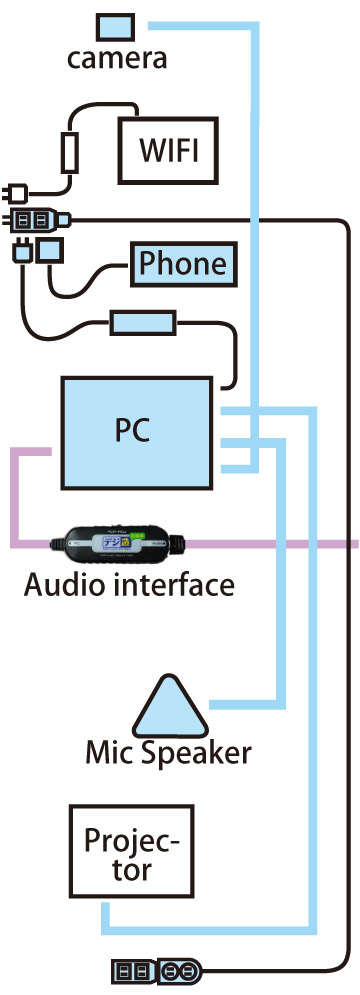
Connecting the speaker at the community center to a computer
This is a system for streaming audio from a line input connected to a microphone, etc. via ZOOM.
The advantage of this system is that the audio can be made clearer when streaming with an instrument such as a piano.
The demelit is that most voices that aren't picked up by the microphone unless pass through mics.
So, those who want to speak must always use a microphone to speak.
Therefore, if you are not using musical instruments, the old system will be sufficient.
With the old system, one microphone is placed in the center of the room to collect all the sound.
*To switch to the traditional method, simply set both the microphone input and output to "YAMAHA YVC-330" in the ZOOM settings.
Differences between old and new ZOOM settings
New (line input)
Old (recorded with one microphone)
(A) Equipments
(1) Equipment group to bring
① Light blue case for Wednesday(■)(contents)
② Guitar
③ Piano(■)(contents)
④ Piano stand(■)
⑤ Case for mixer and microphone set for Wednesday(contents) (■) Lavender color
(2) Items to borrow from the community center
Projector
Community center wireless microphone set (3 microphones)
Microphone stand
Wireless WIFI router
(B) Connection
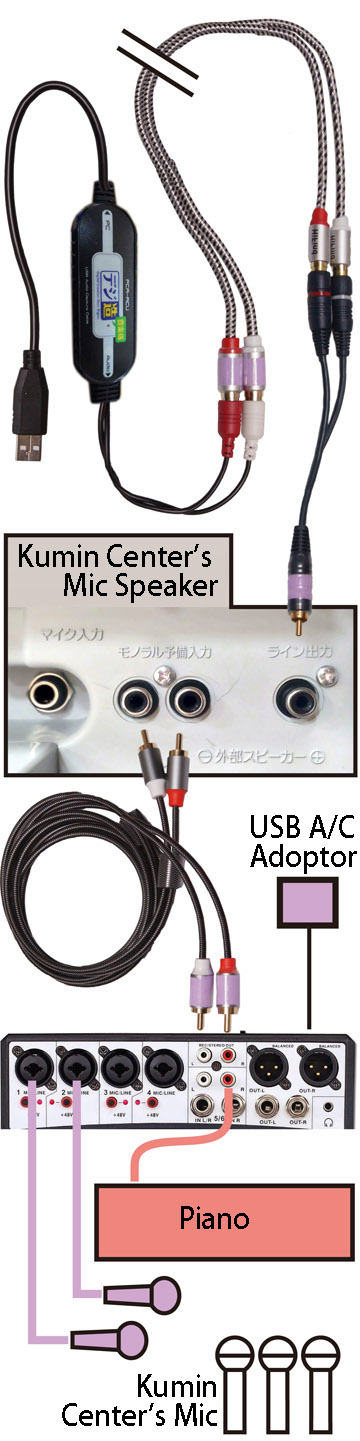
(1) Cable used for connection
Connecting the speaker at the community center to a computer

Connect the mixer to the community center speaker
(2) Illustration of how to connect (computer)
* The colors of the equipment and cables are the colors of the cases they are stored in.
* Equipment without color is belong to the community center.
(If the WiFi at the community center is not available, you can use SCG's smartphone. See the image here.
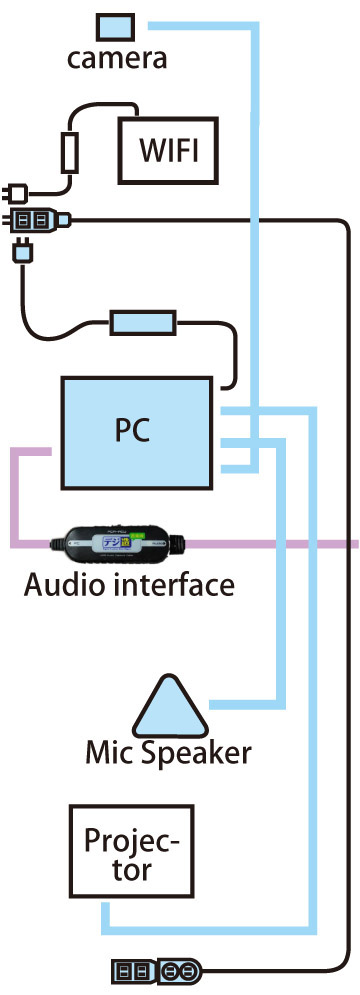

(3) Illustration of how to connect (around the mixer)
*All equipment shown in the photo is lavender in color (■) except for the wireless microphone speaker at the community center.
(C) Finished image in photos
Wall outlet connections (under construction)
Area around the action camera (under construction)
Area around the civic center amplifier speakers
Area around the piano and amplifier speakers
Area around the piano and amplifier speakers (different angle)
(D) ZOOM input/output settings
(1) For the computer microphone (input), select "Line (USB PnP Audio Device)."
(2) For the computer speaker (output), select "Echo Canceling Speakerphone (3- Yamaha YVC-330)."
(3) See the above explanation with images.
ou don't need to set this every time, but for reference we've written down the settings on this page.